
It appends replacement when there’s no letter in completion.
Here’s short gif: works ok for ‘:foo’, but fails on ‘:=’
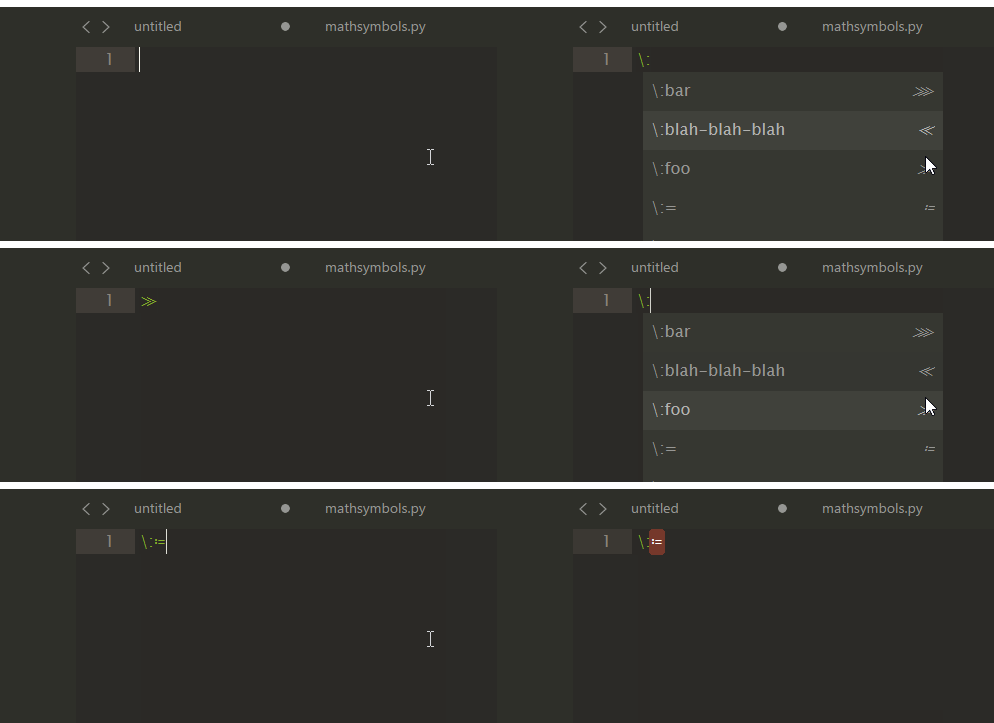
[Bug] Selected completion item replaces text incorrectly
voidex
#1
0 Likes
kingkeith
#3
I can kinda replicate something similar:
test.sublime-completions:
{
    "scope": "source, text",
    "completions": [
        { "trigger": "\\:=", "contents": "><" }
    ]
}
type \: and press Ctrl+Space = \:><
type \ and press Ctrl+Space = \><
but type \:= and press Ctrl+Space = ><
not just slashes that cause it:
{
    "scope": "source, text",
    "completions": [
        { "trigger": "::=", "contents": "><" }
    ]
}
type :: and press Ctrl+Space = ::><
type : and press Ctrl+Space = :><
but type ::= and press Ctrl+Space = ><
I think it is to do with word separator characters? but either way, it is a bug, and should be reported at https://github.com/SublimeTextIssues/Core/issues
2 Likes
voidex
#4
I have no snippet files. I’m using my plugin, so these completions was got from on_query_completion:
[("\\:foo", "≫"), ("\\:=", "≔"), ...]
Anyway, thanks to @kingkeith, he has shown similar issue for .sublime-completions
0 Likes