Hi,
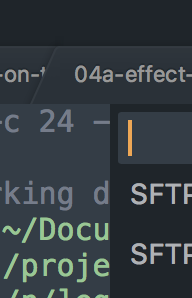
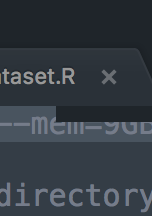
I regularly have a problem with the ST’s command palette. It used to work fine. Now I use the key combo and the command palette is displayed incorrectly. Here is a screenshot. The tiny black bar is what appears instead of the entire command palette. Below is a second screenshot showing how it is supposed to look. I can fix the problem by closing the (incorrectly rendered) command palette with esc and reopening it with the key combo.
This just happens from time to time. I think it is more likely to occur after I run a custom plugin that uses an InputHandlers AND at the end calls another custom command with self.window.run_command("slurm_jobs", args = {'cluster': self.cluster}). The structure of this plugin is like this. But this is all a little weird. Why should this happen after running a different command? Happy to provide more details to figure this out.
class SlurmStatusCommand(sublime_plugin.WindowCommand):

    def input(self, args):
        return ClusterInputHandler(self.window.active_view())

    def run(self, cluster):
        sublime.set_timeout_async(self.slurm_status, 1)

    def slurm_status(self):
        ...
        self.window.run_command("slurm_jobs", args = {'cluster': self.cluster})
Software and hardware: ST 3175, macOS 10.13.5, 2016 13’’ Macbook Pro.
Incorrect
Correct