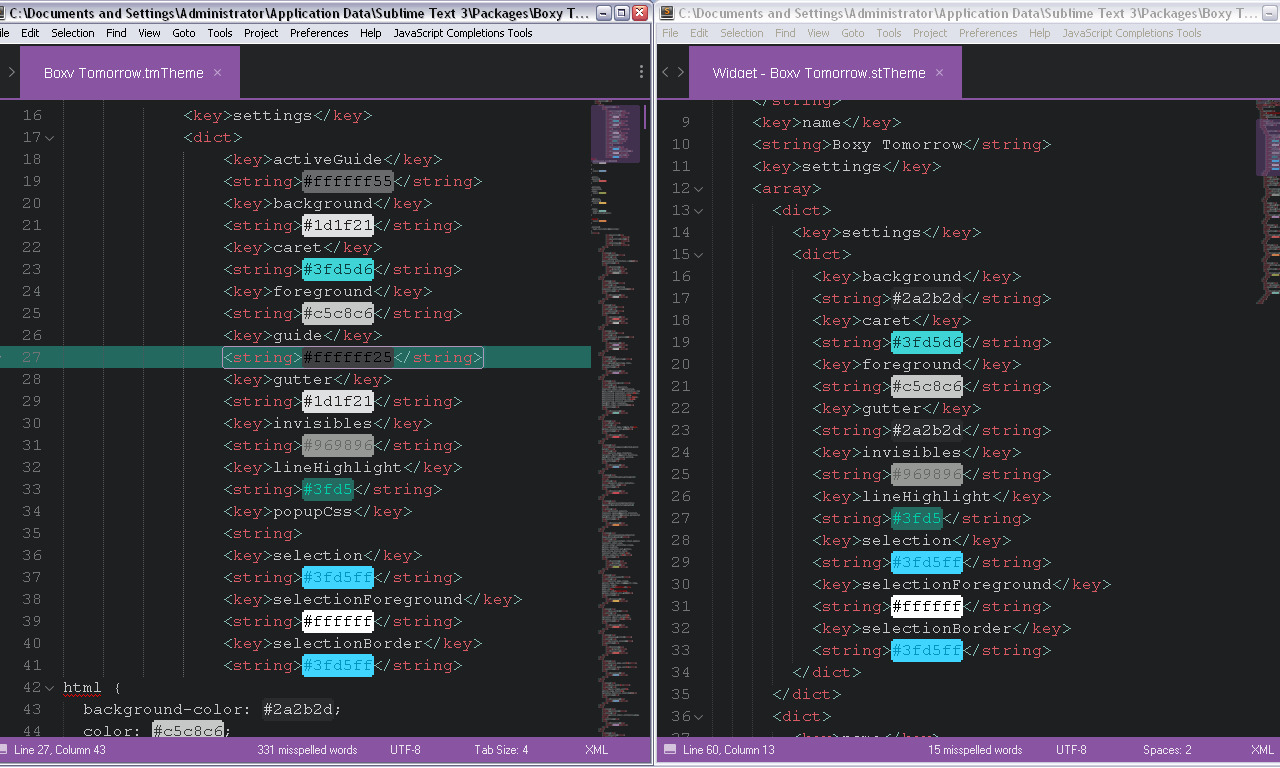
I have another question. How do I change highlight? This is my code:
Uploading…
Uploading…
Uploading…

I have another question. How do I change highlight? This is my code:
As I can see you have copy-paste error:
selection, selectionForeground & selectionBorder shouldn’t be the part of popupCss.
For lineHightlight better to use #xxxxxx or #xxxxxxyy format.
Well, now it repeatedly (and I mean like every time I click) gives me an error message that somewhere there is a duplicate. Code remains the same except now these three features are under line-highlight. Sorry for potentially noob questions, it’s just that I don’t know any XML.
Just remove Packages\Boxy Theme folder which you can find via menu item Preferences -> Browse Packages and repeat that steps with colors only changing.
Well, that will reset everything. So, in theory, it will be still complaining about the same error.
I’ve been using this theme for months now and I’m glad you created it!
I use a plugin called “Vintageous” (to bring vim to sublimetext). Would it be possible to support changing the colour of the status bar, according to which mode we’re in (vim has the normal mode and the insert mode)… I was thinking of something like powerline/airline for Vim.
@hbar that’s a pretty good idea! And that makes me think about a plugin I’ve seen on package_control_channel
The author had about the same idea: tweak the theme too support the setting pytest_is_red and pytest_is_green to color the status bar… And I think that’s a really good idea! IMO, themes should support this with some conventional settings, for example:
status_bar_errorstatus_bar_successstatus_bar_infostatus_bar_warningAnd maybe status_bar_colorful to enable those color changes…
@ihodev what do you think?
I like this idea and convention 
status_bar_colorful to enable colors.
I propose to name settings the same way as in Bootstrap: http://getbootstrap.com/components/#panels-alternatives
status_bar_primarystatus_bar_successstatus_bar_infostatus_bar_warningstatus_bar_dangerIf this will be implemented in PyTest I’ll add those settings to the Boxy Theme.
On darker themes it is hard to see both the selected line and text selections. Is there a way to make it more prominent?
Only via manual customization. See https://github.com/ihodev/sublime-boxy/wiki/Settings#advanced for more details.
I’m changing the line
<key>lineHighlight</key>
<string>00000030</string>
But nothing changes. What am I doing wrong?
You you forgot to add #, this is hex value of the color + opacity (#<xxxxxx:color><xx:opacity>)
<key>lineHighlight</key>
<string>#00000030</string>
No, I did not, I actually had that, sorry:
      <key>lineHighlight</key>
      <string>#db9a39</string>
This is in the file named “Boxy Monokai.stTheme”. I’m using the boxy monokai theme.
stTheme changes colors of the widgets (output panel, find and replace, command palette), you have to change tmTheme which affects color schemes, you can find it in the schemes folder.
Just started using ST. I am trying to manual customization according to the link above. I am using Boxy Tomorrow theme so I opened Boxy Tomorrow.tmTheme file.
as recommended there, I’d like to set
“caret_extra_width”: 1,
in this case, what exactly text need to be inserted into file and where?
Thanks
That setting should go in your user preferences, not in the theme file itself.
So you can just select Preferences > Settings from the menu (Sublime Text > Preferences > Settings if you are on a Mac) and add the setting to the right hand pane.
Hi there!
I love this theme, its a really good job 
I’m using Monokai theme with Orange color scheme. Only 1 thing bothers me: the font color in the sidebar. How can I change that? I was looking for it but couldn’t find it  My eyes are not the best so I need a little contrast for the text.
Hello Stefanie!
Thank you for the kind words
Unfortunately it’s not possible with current approach. You have to tweak it manually:
Packages/Boxy Theme/Boxy Monokai.sublime-theme file. //
// Sidebar Entry
//
{
"class": "sidebar_label",
"color": [151, 151, 148] // Red, Green, Blue
},
P.S. Currently I’m working on a new adaptive theme with better settings management. I hope I’ll finish beta version at the end of July. So keep in touch, your issue will be resolved soon.
Hi ihodev!
Thanks for the help! Its okay for me to edit this manually, luckily I feel home within these codes Altough, would be nice to have an option for others as well to edit the font colors, cause as I mentioned before, my eyes prefer a bit contrasted text labels. 