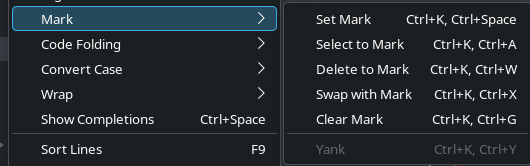
Hi, I’m running Sublime 4200 and I’m completely missing the bookmark functionality. My system:
Operating System: Fedora Linux 43
KDE Plasma Version: 6.6.4
KDE Frameworks Version: 6.26.0
Qt Version: 6.10.3
Kernel Version: 7.0.9-102.fc43.x86_64 (64-bit)
Graphics Platform: Wayland
Processors: 16 × 11th Gen Intel® Core™ i7-11700K @ 3.60GHz
Memory: 32 GiB of RAM (31.2 GiB usable)
Graphics Processor: NVIDIA GeForce RTX 2080 SUPER
Manufacturer: Gigabyte Technology Co., Ltd.
Product Name: Z590 AORUS ELITE AX
You can see above the LSP actions there’s just a missing section where I believe the bookmarks should be.
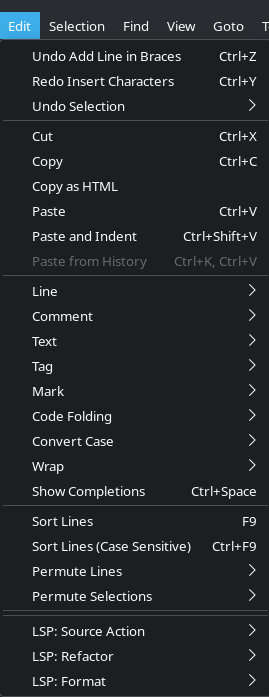
I don’t see any errors in the sublime console:
startup, version: 4200 linux x64 channel: stable
executable: /opt/sublime_text/sublime_text
application: /opt/sublime_text
working dir: /home/reuben
packages path: /home/reuben/.config/sublime-text/Packages
state path: /home/reuben/.config/sublime-text/Local
zip path: /opt/sublime_text/Packages
zip path: /home/reuben/.config/sublime-text/Installed Packages
ignored_packages: [“Vintage”]
pre session restore time: 0.126663
startup time: 0.158008
first paint time: 0.166344
git: using configuration from system git install
git: tracking working dir /home/reuben/dev/aurora
reloading python 3.3 plugin HLSL Syntax.Scripts
reloading python 3.3 plugin Zig Language.Zig
reloading plugin Default.arithmetic
reloading plugin Default.auto_indent_tag
reloading plugin Default.block
reloading plugin Default.colors
reloading plugin Default.comment
reloading plugin Default.convert_color_scheme
reloading plugin Default.convert_syntax
reloading plugin Default.copy_path
reloading plugin Default.echo
reloading plugin Default.exec
reloading plugin Default.fold
reloading plugin Default.goto_line
reloading plugin Default.history_list
reloading plugin Default.html_print
reloading plugin Default.indentation
reloading plugin Default.install_package_control
reloading plugin Default.keymap
reloading plugin Default.kill_ring
reloading plugin Default.mark
reloading plugin Default.new_templates
reloading plugin Default.open_context_url
reloading plugin Default.open_in_browser
reloading plugin Default.pane
reloading plugin Default.paragraph
reloading plugin Default.paste_from_history
reloading plugin Default.profile
reloading plugin Default.quick_panel
reloading plugin Default.rename
reloading plugin Default.run_syntax_tests
reloading plugin Default.save_on_focus_lost
reloading plugin Default.scroll
reloading plugin Default.set_unsaved_view_name
reloading plugin Default.settings
reloading plugin Default.show_scope_name
reloading plugin Default.side_bar
reloading plugin Default.sort
reloading plugin Default.switch_file
reloading plugin Default.symbol
reloading plugin Default.transform
reloading plugin Default.transpose
reloading plugin Default.ui
reloading plugin CSS.css_completions
reloading plugin Diff.diff
reloading plugin HTML.encode_html_entities
reloading plugin HTML.html_completions
reloading plugin LSP.boot
reloading plugin Package Control.plugin
plugins loaded
Package Control: All specified packages up-to-date!
Any help would be appreciated, thank you!