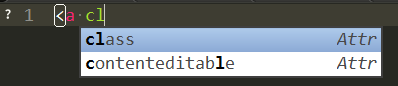
Hi guys! I’m new to ST3 (just downloaded the latest build), and I have this issue: when I open new HTML file in ST3, the autocomplete only works when I hold ctrl+space (I use win 10), when I open css files, the autocomplete window pops when I type, without the need to hold any key. I want the same to be when I edit HTML (or any other file type, for that matter).
How do I do that? Why the HTML autocomplete dosen’t show up?
I copied this line to the user settings, after an answer to similar quetion, and its not working:
“auto_complete_selector”: “source, comment, text.plain, meta.tag, punctuation.definition.tag.begin, css”,
I use the HTML sinppets and AllAutocomplete packeges.
What can I do to solve this issue?
Thanks,
Yishai