
I know its a noobie question, but I just started to learn some python, while I code in SL3 the instructor codes in Jupiter Notebook, and for example when he wants to append a list he just puts a dot and then click tab, he get all the commands he can use on that list, since It seems SL3 doesn’t has that (I just get 8 spaces), I tried to download some plugin named Jedi but when im trying to edit the settings to enable it, I always get some parsing error on a specific char. I just need someone to help me to enable it, Thank you.
Autocompiltion while clicking tab after a dot
deathaxe
#2
Jedi is a good start, LSP package would be suitable as well.
Both require a dedicated python to be available on your system to run the actual “language server”, which parses your code and creates the suggestions.
If you want to use jedi, you need to pip install jedi to get the jedi parser.
The LSP package needs the pip install python-language-server and the following entry in the Packages/User/LSP.sublime-settings
{
	"clients":
	{
		"pyls":
		{
			"enabled": true,
		}
	},
}
1 Like
imso3k
#3
I Just installed LSP, and I do have it enabled in the SL settings , but I get this error message : 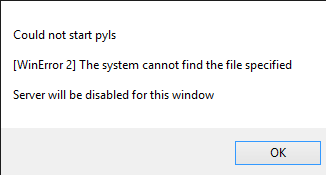
As I said, im new to all of this, no clue what it says.
Jedi for example instructs to add a trigger with :
# User/Preferences.sublime-settings or User/Python.sublime-settings
{
// …
“auto_complete_triggers”: [{“selector”: “source.python”, “characters”: “.”}],
}
How do I define a trigger?
0 Likes
deathaxe
#5
For LSP package:
WinError 2 means the pyls.exe was not found in your global %PATH% environment. pyls.exe is the name of the python-language-server executable, which is created by running pip install python-language-server
If you installed python via set it should have added itself to the %PATH%, I think. You have two options here:
- Add your python to the path manually (e.g. C:\python37\Scripts;C:\python37)
- Assign the full path to pyls.exe to the LSP.sublime-settings
	"clients":
	{
		"pyls":
		{
			"enabled": true,
			"command": ["C:\\python37\\Scripts\\pyls.exe"],
		}
	},
Additional auto-complete triggers are not required if you use LSP. It configures them on itself.
2 Likes
imso3k
#6
I checked my scripts folder and it has no pyls.exe in it, plus everytime I open SL now it tries to load pyls.exe as it says at the bottom and now I get this error 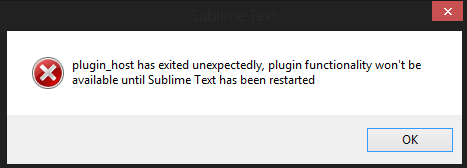
after this the whole package control crashes, and I cant re-install or install any package. how do I install that pyls.exe?
I do have Anaconda installed (dont know if it matters) and I did “pip install python-language-server” via CMD twice to double check and got “Requirements already satisfied” for everything. I probably messed all up with different installations.
EDIT : seems like all the scripts are at the annaconda folder, I found pyls.exe there, and I checked my %PATH% setting and C:\Users~My UserName~\Anaconda3\Scripts is there.
EDIT 2 : downgraded my PLS to 0.20 and it works fine, Thank you very much for the help and patience!!!.
0 Likes