
In distraction free mode of sublime text 3, selecting code with mouse does not go downward. It works fine upwards but not downwards.
Screenshot of the file:
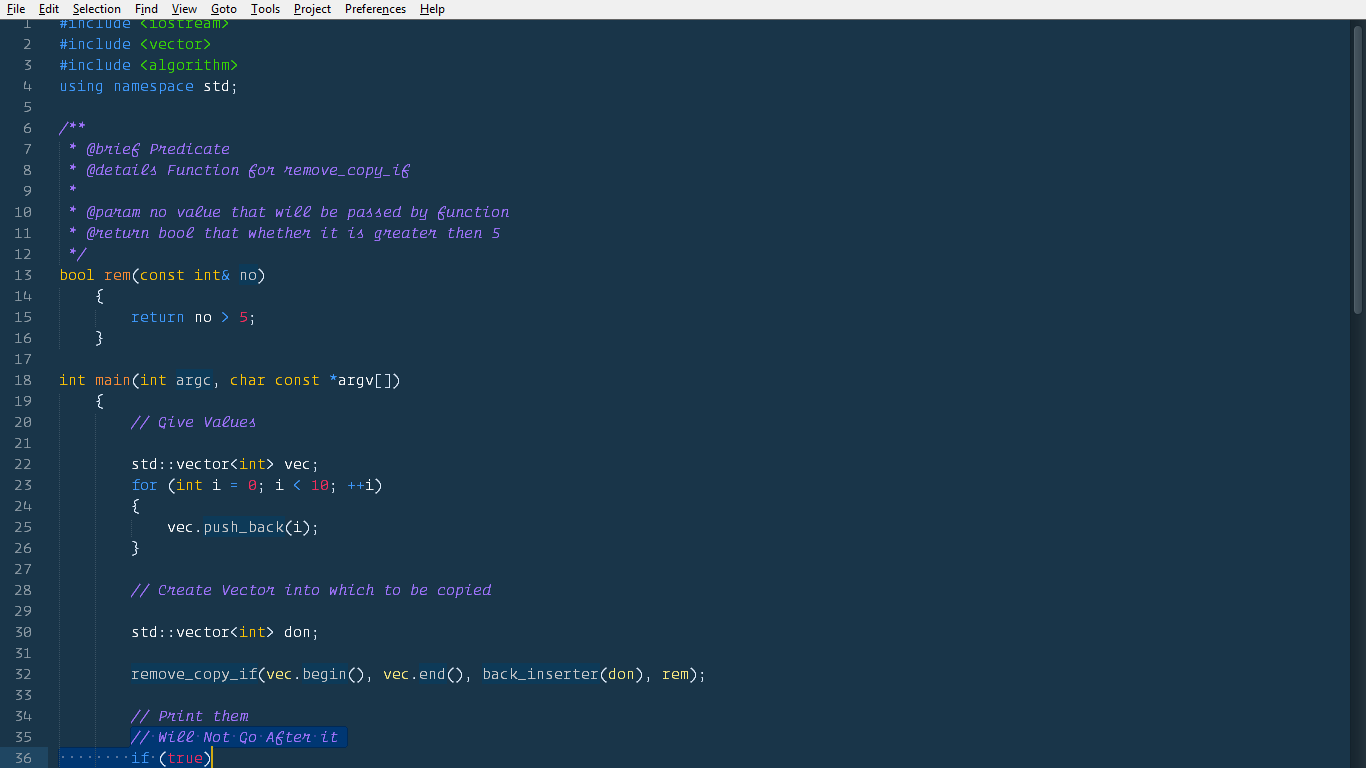
As you can see after selecting and dragging it down , it doesn’t go.
Why is this happening?
My Settings:
User
{
“bold_folder_labels”: true,
“caret_extra_bottom”: 2,
“caret_extra_top”: 2,
“caret_extra_width”: 0,
“caret_style”: “phase”,
“detect_indentation”: true,
“color_scheme”: “Packages/User/My Custom.tmTheme”,
“font_face”: “operator mono xlight”,
“highlight_line”: true,
“highlight_modified_tabs”: true,
“ignored_packages”:
[
“Vintage”
],
“indent_guide_options”:
[
“draw_normal”,
“draw_active”
],
“line_padding_bottom”: 1,
“line_padding_top”: 1,
“margin” : 10,
“theme”: “Cobalt2.sublime-theme”,
“wide_caret”: true,
“word_wrap”: true,
“wrap_width”: 0,
“font_size” : 12,
“auto_complete”: true,
“auto_complete_commit_on_tab”: true,
“auto_complete_with_fields”: true,
“detect_indentation”: true,
“font_options”:
[
“subpixel_antialias”
],
    "highlight_modified_tabs": true,
    "tab_size": 4,
    "translate_tabs_to_spaces": true,
    "trim_trailing_white_space_on_save": true,

}
Distraction Free Mode
{
“gutter” : true,
“line_numbers” : true,
“draw_centered” : false,
“wrap_width” : 0,
“scroll_past_end”: true,
}