Sublime Forum

Another weird issue where you can't type over

#1

I’m baffled as to what is causing this. Not sure if it came across in the last update, or something else. Basically it goes into a mode where I can’t do anything apart from move the cursor around:
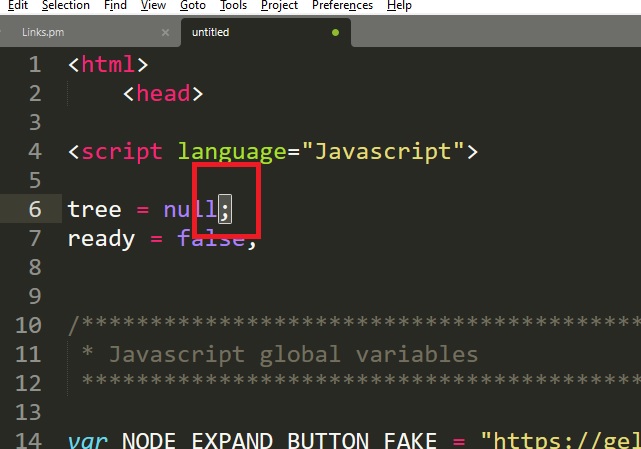
error

Looking at the bottom I see COMMAND MODE, line 16 column 17… so maybe I’m enabling that mode by accident with a key combination? I can’t see how to disable it!

Thanks

Andy

0 Likes

#2

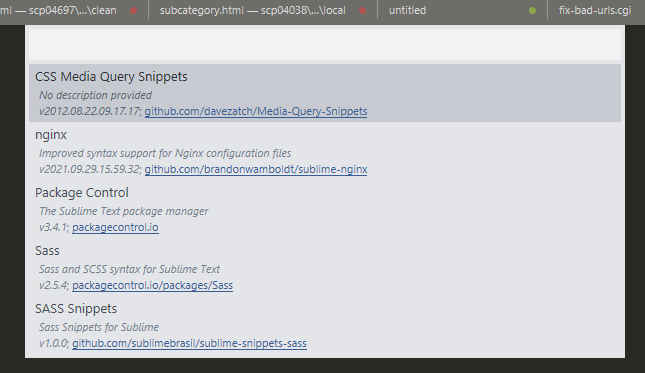
One of your packages is doing this. I’d recommend using Package Control: List Packages to see what you have got installed and then using ignored_packages setting to find out which package it is.

0 Likes

#3

Pretty much looks like Vintage package being involved, which causes ST to behave like VIM.

0 Likes

#4

Thanks. Will have a play tomorrow when I’m a bit more fresh :slight_smile: I’ve only got 5 packages installed:

error

0 Likes

#5

It’s almost certainly Vintage; it comes shipped with Sublime by default and the default ignored_packages setting includes it to turn it off for people that aren’t expecting it.

All you have to do it add it back to the list of ignored packages.

0 Likes

#6

Thanks. I’ve added “Vintage” to my ignored_packages. Still see if that helps :slight_smile: (it was working, but then it would randomly do the cursor thing when it puts it into “Command mode”)

0 Likes