Sublime Forum

3133 Install Errors

#1

On install

WARNING: Showing only expired overrides!
WARNING: Non-expired overrides may exist!

Report Generated: 2017-06-05 05:38:38

[S U] Color Scheme - Default
** `- [X] Monokai.tmTheme**

Also checking new menu item (not sure why it is there)

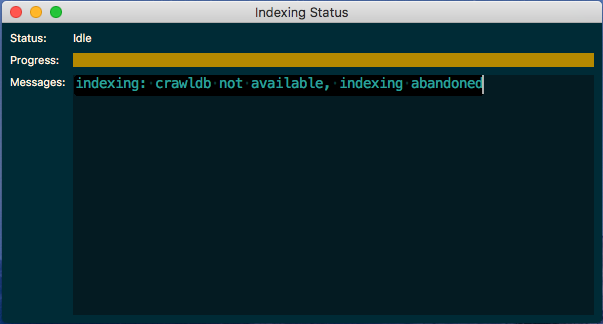
indexing: crawldb not available, indexing abandoned

What to do?

0 Likes

#2

That is OverrideAudit telling you that you have an overriden version of Default/Monokai.tmTheme (i.e. you made some changes to it) but on update the version of the file that ships with Sublime has been updated.

Sublime is currently still using your modified version and ignoring the “official” updates to the file. You can select Tools > OverrideAudit > Diff Single Override from the menu and then select Default and Monokai.tmTheme from the popup to see what’s different between your version of the file and the underlying file and decide how you want to merge your changes together.

1 Like

#3

OdatNurd’s repy nips a fundamental philosophical question for Sublime’s heavenly developers, and confusion for the rest of some of the sum of us.

Since we run ST2/ST-3126/ST-3133 for practical reasons, where is that theme over-ridden?

In other words, do the children all dance one ZOMBIE step, or do they creatively Tango, with the 3133 update?

When that question of desktop ‘interlocution’ of the 3133 update is answered, then we can understand the amazing complexity of Sublime versioning. Well enough to proceed safely and efficiently with each version’s behavior management regimen (ergo, customizations). Naturally, we see only one Application Support\Sublime Text 3 folder, contributing to our confusion!

Noted that it is an easy matter to simply copy our devo customizations back into a folder where those customizations have been trashed. so another question… is it okay to copy (or redo) 3126 customizations? In a pinch, we could drop back to ST2112, if you take my meaning (groan).

0 Likes

#4

This isn’t something that Sublime does by default; it’s a third party package that you installed doing it. As such the Sublime developers aren’t involved. An upcoming update to OverrideAudit will include some extra help text in the various reports to help clear up this kind of confusion, but various work commitments have kept me away from being able to work on OA in my free time for the last little while, so things have not progressed as quickly as I’d like.

All versions of ST3 share the same configuration information (including overrides) unless you’re using Windows and specifically install the portable version instead of doing a regular install. So it’s actually over-ridden in all of the versions of Sublime Text 3 that you use. The file that you originally modified is based on whatever version of Sublime you were using at the time.

The recent development builds have been improving syntax highlighting in the shipped color schemes, so if you’re actively running 3127 or newer your override is probably out of date and missing the changes that were added most recently (I don’t know exactly what build the changes happened in, since I just use the default).

The best solution to the problem is to use the diff functionality I mentioned above to see what’s different between the base version of the file and your own override to see what you might be missing. You can edit your own copy of the file to include any changes that you like or create a brand new override based on the latest version of the file and then re-apply your changes.

OverrideAudit runs this check every time the build number changes from what it was last time in order to keep you apprised of potential problems. If you’re happy with the override as it currently stands, you can right-click (option-click on MacOS) on the override name in the report and choose the Freshen operation to tell OverrideAudit that you don’t consider the file to be expired any longer; that will stop it from warning you until the next time that the file changes in a future build.

0 Likes

#5

I tend to be more clumsy than that. I simply copy back over changes, and if that gums things up, then uninstall and reinstall, re-customize.

Diff? I thought that was for programmers, not designers.

Override sounds like a fabulous tool for industrial grade sharpening of the tool. I suspect that Override will benefit package developers hugely.

0 Likes