Sublime Forum

Viewport Calculations in a View

#1

Does anyone know where there might be documentation on these View methods over and above the docstrings with the methods?

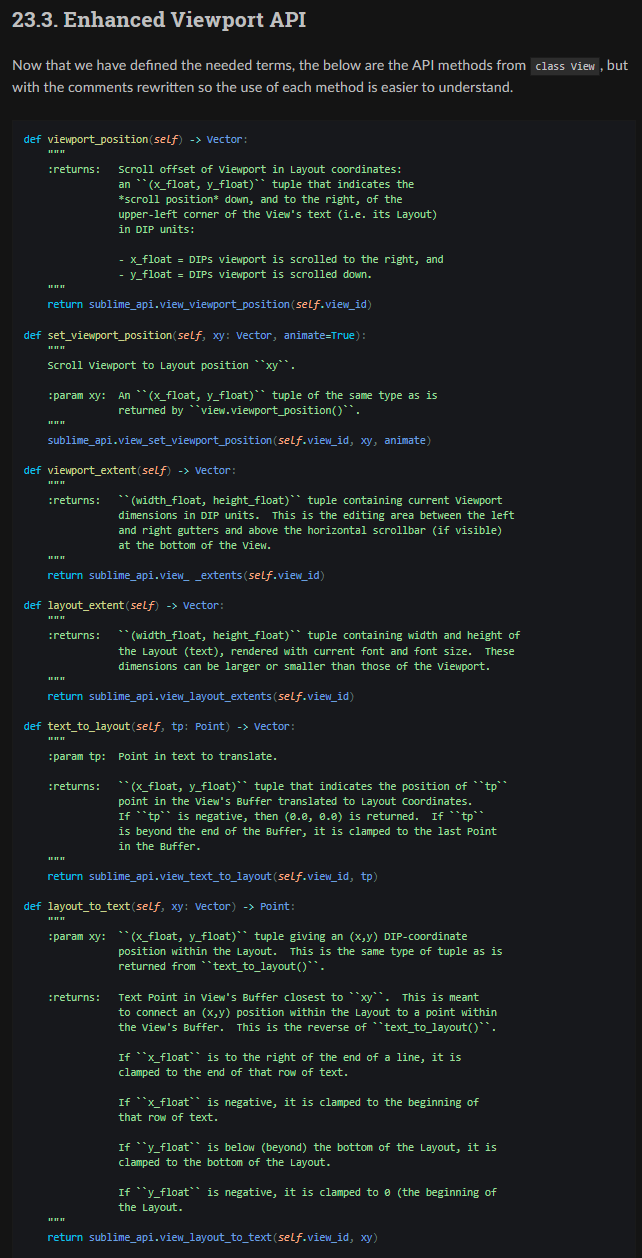
    def viewport_position(self) -> Vector:
        """ :returns: The offset of the viewport in layout coordinates. """
        return sublime_api.view_viewport_position(self.view_id)

    def set_viewport_position(self, xy: Vector, animate=True):
        """ Scrolls the viewport to the given layout position. """
        sublime_api.view_set_viewport_position(self.view_id, xy, animate)

    def viewport_extent(self) -> Vector:
        """ :returns: The width and height of the viewport. """
        return sublime_api.view_viewport_extents(self.view_id)

    def layout_extent(self) -> Vector:
        """ :returns: The width and height of the layout. """
        return sublime_api.view_layout_extents(self.view_id)

    def text_to_layout(self, tp: Point) -> Vector:
        """ Convert a text point to a layout position. """
        return sublime_api.view_text_to_layout(self.view_id, tp)

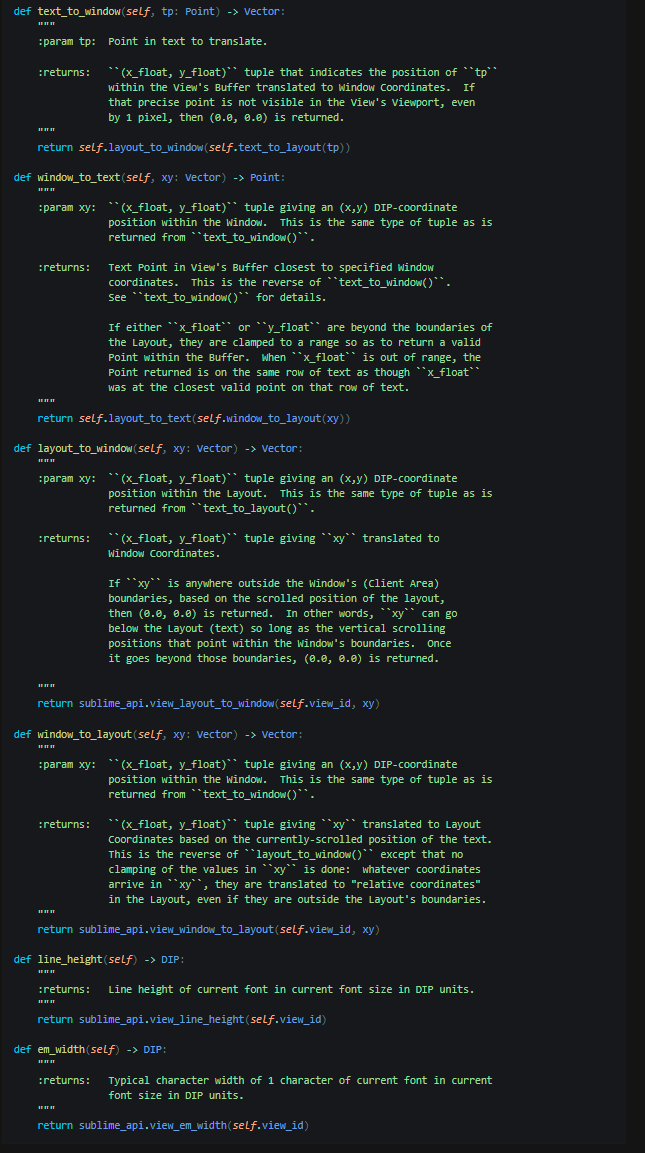
    def text_to_window(self, tp: Point) -> Vector:
        """ Convert a text point to a window position. """
        return self.layout_to_window(self.text_to_layout(tp))

    def layout_to_text(self, xy: Vector) -> Point:
        """ Convert a layout position to a text point. """
        return sublime_api.view_layout_to_text(self.view_id, xy)

    def layout_to_window(self, xy: Vector) -> Vector:
        """ Convert a layout position to a window position. """
        return sublime_api.view_layout_to_window(self.view_id, xy)

    def window_to_layout(self, xy: Vector) -> Vector:
        """ Convert a window position to a layout position. """
        return sublime_api.view_window_to_layout(self.view_id, xy)

    def window_to_text(self, xy: Vector) -> Point:
        """ Convert a window position to a text point. """
        return self.layout_to_text(self.window_to_layout(xy))

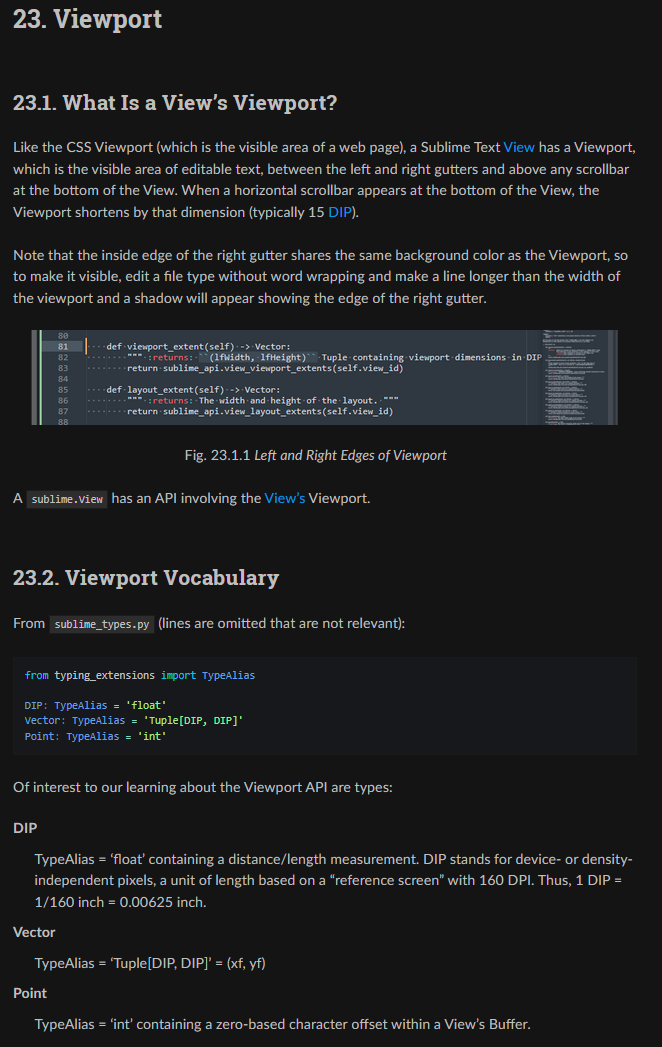
Does it follow a viewport model (such as CSS) that I can go dig into and learn how to use these functions? (About 20 years ago, I remember doing something similar in C in WIN32, so I’m not a complete beginner, but my memory of it is rusty.) While I have (I think) the correct meanings of DIP, I need Sublime Text definitions for:

  • Viewport (I think it might be the editing area between left and right gutters, below tabs and above the lower scroll bar)
  • Position ?
  • Extent ? Dimensions in DPI?
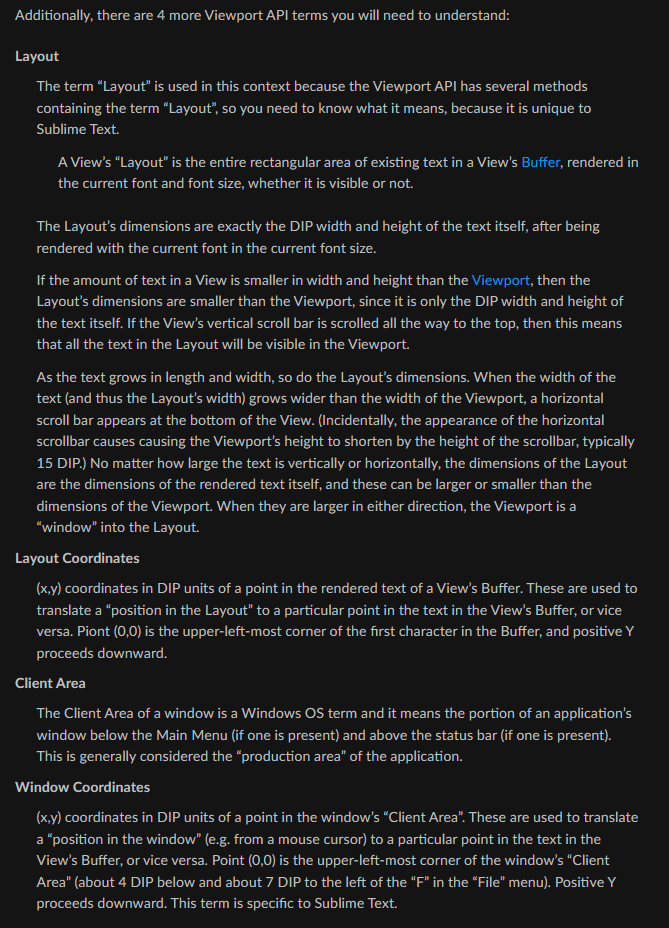
  • Layout (that layout_extent() gets the width and height of) ?
  • Text pt vs Layout pt
  • Text pt vs Window pt
  • etc.

Kind regards,
Vic

EDIT:

Don’t anyone do a huge write-up for me explaining these. Reason: I’m doing one myself by experimenting, and writing clear English explanations for what these methods do. I will share it here when I am completed.
0 Likes

#2

Here is the FULL answer in 4 parts. The definitions introduced in Parts 1 and 2 are needed to understand the comments in the API.

Part 1:

Part 2:

Part 3:

Part 4:

And this is the web page where this is hosted (in case you need to copy/paste or read on your phone).

1 Like

#4

I STRONGLY recommend the sublime.View class source code docstrings be replaced with those I supplied or ones like it so that people can learn to use those functions! More such knowledge will boost Sublime Text’s market! (Note: the terms defined in Part 2 also need to be defined within the source code because they are unique to Sublime Text and are defined nowhere else in publicly-available documentation that I have found.)

1 Like

#5

I will follow topic with interest to learn. I have some “off piste” uses for oddball views. But tip. You might consider hosting on a secure host (https) as sandbox.

0 Likes

#6

I have a use for it for accurate measurement of where a certain line of text was “in the past”. Let’s say I added a lot of text ABOVE that line and then wanted to come back to the original 2 hours later with 1 keystroke. Where do I programmatically scroll the display to ensure the line is where it was (say 2/5 of the way down the screen) when it was originally recorded? Now I have the answer!

There are also mouse applications to correlate mouse positions to text, and possibly other things I’m not aware of yet.

It turns out these methods are not only very powerful, but also very basic to the application. I’ll wager that text_to_layout() and layout_to_text() are intensely involved in selecting text with the mouse, and simple things like moving the caret as a result of a mouse click. And if mouse coordinates come in “window coordinates” then it would have to travel through the window versions of these functions. I expect to know more about mouse coordinates soon, but my work has generally been driven by knowledge I NEED NOW to implement something I need (e.g. in a customization). The above was no exception.

P.S. Thank you for introducing me to the term “off piste” (compares an activity to back-country skiing in untouched snow). Nice comparison.

0 Likes

#7

Researching . I interpreted the requirement you explain above as “bookmarking” text positions in changing file layouts. I found this … a new discovery for me … https://www.macdrifter.com/2012/07/sublime-text-bookmarks.html … my attention at the moment is mapping Subl Text snippets to PDF form elements and I’ve learned a way forward with help of Claude. But you always need to lead on the idea and nudge in your direction. Or you end in a rabbithole. So today I’ve learned about text bookmarks and how to text map to PDF from snippets.

P.S, In above link I also found WordHighlight which might help locate keywords in large oceans of text.

0 Likes

#8

Interesting something very similar is done natively by Sublime Text using the [Find All] button of the Find Panel and [Alt-F3] for placing a selection at every occurrence of the selected text. Have you investigated those? I have to wonder if those features of Sublime Text were not added after the referenced Package was released – to “add them in” because they were useful…

0 Likes

#9

P.S. I learned a LOT more about the Viewport API this morning and factored my new knowledge into the screenshots and website where they are hosted.

0 Likes

#10

Rather than digging into Subl Text I follow my principle of using any handy tool available (more cogs) and I find that ripgrep helps to rip through Project. Then I dive into each file listed. Crude but it works for me.

1 Like

#11

Sublime Text’s [Ctrl+Shift+F] does something similar to ripgrep right in Sublime Text. I use it heavily, especially when I need to find out where a variable or function occurs in a body of source code.

0 Likes

#12

Premium content as always

1 Like