While using Sublime Text (Dev 2195) on Mac OS X Lion, the option System Preferences from Apple menu is disabled(click it, and nothing happened), see the attachment, I’m using Simplified Chinese.
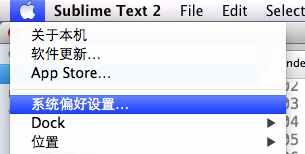

While using Sublime Text (Dev 2195) on Mac OS X Lion, the option System Preferences from Apple menu is disabled(click it, and nothing happened), see the attachment, I’m using Simplified Chinese.
I can confirm that this is also an issue for Dev 2198 on OS X 10.7.4 using English.
A few other notes:
Same here in 10.7.4 with ST2 2198.
Apple menu items that do not work while ST2 is focused:
https://forum.sublimetext.com/t/mac-os-cant-open-system-preferences/6101/1
Same issue. Hopefully this will get fixed in a future version.