
Definitely True. The LLM-coders are too strong.
Implement AI into Sublime Text
IGRACH
#22
If you add any AI stuff please leave an option to turn it off for us old people xD
3 Likes
BPL
#23
Hi guys, what’s the current state of the art in AI for ST? Are there any packages similar to Cursor available?
Never coded in vscode but I saw a video of that package and it seems quite helpful to speed up certain coding tasks.
Thanks
0 Likes
mikko
#25
@bschaaf just a general question… working on AI? yes / no / no-comment  The tools are here to stay. Would be happy to send some thoughts your way or to add some here if you want to.
0 Likes
DrJasonPolak
#26
I just bought Sublime Text 4. And the very reason I bought it is because I hate AI and I am sick of seeing AI integrated into editors. It’s fine for others as a plugin, even though I oppose AI, but I would hate to see any default integration of AI into Sublime.
100% against it.
10 Likes
kiamlaluno
#28
I agree it should be a plugin: People who want to use AI for writing code should be allowed to decide which plugin to use.
If they want to stop using AI for coding, they will just uninstall the plugin they installed, rather having code in Sublime Text that is not used.
2 Likes
DamhertPro
#29
A plugin for AI is fine, but I do not what to see this integrated in Sublime Text. I don’t want to use AI myself which is why I chose the Sublime Apps.
3 Likes
textvectors
#30
My first maiden post here. But it was flagged as off topic. Second time. I will try to dust myself down and attempt to bring it back “on topic”.
The OP topic is “Implement AI into Sublime Text”.
My submission was - simply - to “Implement AI (optionally) outside Sublime Text - by using a toolchain”.
And the intermediary tool I suggested in a toolchain was Albert in Linux and Alfred in Mac. Can’t remember the Windows alternative.
That is use Albert (in Linux) as the choreographer to link AI and ST.
There was a precedent post some time back on a similar theme.
0 Likes
legran
#31
I’m late, but I’d like to contribute something. In addition, fortunately, there is already integration with Copilot in Sublime. The Codeium plugin works quite well after a few tweaks. The plugin as it stands doesn’t work well when it comes to Enabling and Disabling autocomplete, which makes it very cumbersome to use. With these tweaks in the code, the following are solved:
import html
import logging
from threading import Lock
from threading import Thread
from Codeium.login import CodeiumSettings
from Codeium.protorequests import CancelRequestRequest
from Codeium.protorequests import GetCompletionsRequest
import sublime
import sublime_plugin
CODEIUM_STATE_SUCCESS = 3
COMPLETION_PART_TYPE_UNSPECIFIED = 0
COMPLETION_PART_TYPE_INLINE = 1
COMPLETION_PART_TYPE_BLOCK = 2
COMPLETION_PART_TYPE_INLINE_MASK = 3
class CodeiumCompletionPart:
def __init__(self, text, point):
self.text = text
self.point = point
class CodeiumCompletion:
def __init__(self):
self.inline_parts = []
self.block = None
def add_inline(self, text, point):
self.inline_parts.append(CodeiumCompletionPart(text, point))
def add_block(self, text, point):
self.block = CodeiumCompletionPart(text, point)
def is_active_view(obj):
return bool(obj and obj == sublime.active_window().active_view())
lock = Lock()
completions = []
index = 0
display = False
for_position = -1
def make_async_request(req, view):
global completions, index, for_position
print("sent completion request")
resp = req.send()
if resp and resp.state.state == CODEIUM_STATE_SUCCESS:
print("response is:", resp.state.message)
c = []
for item in resp.completion_items:
completion = CodeiumCompletion()
for part in item.completion_parts:
offset = view.text_point_utf8(0, part.offset)
if part.type == COMPLETION_PART_TYPE_INLINE:
completion.add_inline(part.text, offset)
elif part.type == COMPLETION_PART_TYPE_BLOCK:
completion.add_block(part.text, offset)
c.append(completion)
if len(c) > 0:
lock.acquire()
completions = c
index = -1
for_position = view.sel()[0].begin()
lock.release()
view.settings().set("Codeium.completion_active", True)
view.run_command("codeium_display_completion")
class RequestCompletionListener(sublime_plugin.EventListener):
def on_modified_async(self, view):
if (
is_active_view(view)
and CodeiumSettings.enable
and CodeiumSettings.api_key != ""
):
if hasattr(self, "req") and hasattr(getattr(self, "req"), "id"):
# Cancelar la solicitud anterior
print("sent cancel")
CancelRequestRequest(getattr(self, "req").id).send()
self.req = GetCompletionsRequest(view)
# Iniciar el hilo
t = Thread(target=make_async_request, args=[self.req, view])
t.start()
def on_selection_modified_async(self, view):
global for_position
if (
is_active_view(view)
and for_position != -1
and view.sel()[0].begin() != for_position
):
PhantomCompletion.hide(view)
for_position = -1
class CodeiumDisplayCompletionCommand(sublime_plugin.TextCommand):
def run(self, edit):
global completions, index, display
if for_position != -1:
lock.acquire()
index = (index + 1) % len(completions)
lock.release()
PhantomCompletion(self.view, completions[index]).show(edit)
class CodeiumDisplayPreviousCompletionCommand(sublime_plugin.TextCommand):
def run(self, edit):
global completions, index, display
if for_position != -1:
lock.acquire()
index = (index + len(completions) - 1) % len(completions)
lock.release()
PhantomCompletion(self.view, completions[index]).show(edit)
class CodeiumRejectCompletionCommand(sublime_plugin.TextCommand):
def run(self, edit):
global completions, index, display
PhantomCompletion.hide(self.view)
lock.acquire()
for_position = -1
lock.release()
self.view.settings().set("Codeium.completion_active", False)
class CodeiumAcceptCompletionCommand(sublime_plugin.TextCommand):
def run(self, edit):
global for_position
if for_position != -1:
PhantomCompletion.hide(self.view)
PhantomCompletion(self.view, completions[index]).make_real(edit)
lock.acquire()
for_position = -1
lock.release()
self.view.settings().set("Codeium.completion_active", False)
_view_to_phantom_set = {}
class PhantomCompletion:
PHANTOM_TEMPLATE = """
<body id="codeium-completion">
<style>
body {{
color: #808080;
font-style: italic;
}}
.codeium-completion-line {{
line-height: 0;
margin-top: {line_padding_top}px;
margin-bottom: {line_padding_bottom}px;
margin-left : 0;
margin-right : 0;
}}
.codeium-completion-line.first {{
margin-top: 0;
}}
</style>
{body}
</body>
"""
PHANTOM_LINE_TEMPLATE = '<div class="codeium-completion-line">{content}</div>'
def __init__(
self,
view: sublime.View,
completion,
) -> None:
self.view = view
self._settings = view.settings()
self._phantom_set = self._get_phantom_set(view)
self.completion = completion
@classmethod
def _get_phantom_set(cls, view: sublime.View) -> sublime.PhantomSet:
view_id = view.id()
# Crear el conjunto de phantoms si no existe
if not _view_to_phantom_set.get(view_id):
_view_to_phantom_set[view_id] = sublime.PhantomSet(view)
return _view_to_phantom_set[view_id]
def normalize_phantom_line(self, line: str) -> str:
return (
html.escape(line)
.replace(" ", " ")
.replace("\t", " " * self._settings.get("tab_size"))
)
def _build_phantom(
self,
lines,
begin: int,
end=None,
*,
inline: bool = True
) -> sublime.Phantom:
body = (
self.normalize_phantom_line(lines)
if isinstance(lines, str)
else "".join(
self.PHANTOM_LINE_TEMPLATE.format(
content=self.normalize_phantom_line(line),
)
for index, line in enumerate(lines)
)
)
return sublime.Phantom(
sublime.Region(begin, begin if end is None else end),
self.PHANTOM_TEMPLATE.format(
body=body,
line_padding_top=int(self._settings.get("line_padding_top")) * 2,
line_padding_bottom=int(self._settings.get("line_padding_bottom")) * 2,
),
sublime.LAYOUT_INLINE if inline else sublime.LAYOUT_BLOCK,
)
def _add_text(self, edit, text, point):
self.view.insert(edit, point, text)
def show(self, edit) -> None:
assert self._phantom_set
self._phantom_set.update([])
cursor = self.view.sel()[0].begin()
completion = self.completion
phantom_set = []
for part in completion.inline_parts:
phantom_set.append(
self._build_phantom(part.text, part.point, self.view.size())
)
if completion.block:
phantom_set.append(
self._build_phantom(
completion.block.text.splitlines(),
completion.block.point,
inline=False,
)
)
else:
phantom_set.append(
self._build_phantom("", self.view.line(cursor).end(), inline=False)
)
self._phantom_set.update(phantom_set)
def make_real(self, edit):
line_ending = "\r\n" if "Windows" in self.view.line_endings() else "\n"
completion = self.completion
cursor = self.view.sel()[0].begin()
added = []
for part in completion.inline_parts:
shift = 0
for pos, amt in added:
if pos < part.point:
shift += amt
self._add_text(edit, part.text, part.point + shift)
added.append((part.point, len(part.text)))
# Mover el cursor al final de la línea
self.view.sel().clear()
line = self.view.line(cursor)
self.view.sel().add(line.end())
if completion.block:
text = line_ending + completion.block.text
self._add_text(edit, text, self.view.line(completion.block.point).end())
@classmethod
def hide(cls, view: sublime.View) -> None:
cls._get_phantom_set(view).update([])
@classmethod
def close(cls, view: sublime.View) -> None:
if view.id() in _view_to_phantom_set:
del _view_to_phantom_set[view.id()]
# Mover la clase CodeiumToggleCommand fuera de PhantomCompletion
class CodeiumToggleCommand(sublime_plugin.ApplicationCommand):
def run(self):
CodeiumSettings.enable = not CodeiumSettings.enable
status = "enabled" if CodeiumSettings.enable else "disabled"
sublime.status_message(f"Codeium completions {status}")
print(f"Codeium completions {status}")
for view in sublime.active_window().views():
view.settings().set("CodeiumSettings.enable", CodeiumSettings.enable)
if not CodeiumSettings.enable:
PhantomCompletion.hide(view)
Then you create a file with the name Default.sublime-commands in your User folder and put this code:
[
{
"caption": "Codeium: Toggle Plugin",
"command": "codeium_toggle"
}
]
And finally you create a keybinding to handle the toggle between enable and disable:
[
	{ "keys": ["ctrl+c"], "command": "codeium_toggle" }
]
And that’s it. Sorry if it wasn’t the right space to deal with it, but I thought it was useful that this info was recorded somewhere in case someone has had the same concerns as me with sublime. I think people reviewing this post may be in a similar situation to me before getting the Codeium plugin up and running.
2 Likes
Apox88
#32
Hi, how are you, thank you very much for your contribution, could you help me to set it up? I didn’t quite understand if I should create a “Plugin” or, where to put that code? Regards
0 Likes
ildella
#33
I jump in.
There are so many providers and tools that the objective should be have plugin for a few of them.
Apparently Tabnine is a very good one, but they abandoned the Sublime plugin development. Because --> https://x.com/tabnine/status/1895945769548644530
We can see as there are 3 levels
- The “AI” per se. OpenAI, DeepSeek, LLAMA, you name it.
- The actual tool that scan your project(s), and is able to contextualise every prompt you send to the AI properly. This is the hard thing. In fact some project are just CLI based (eg: https://www.codebuff.com)
- Finally, the IDE integration: that should just assist while typing, maybe suggest and you know, do the last mile to make life easier and better.
I use AI to write code all the time since two years, and for now I just use the classic chat.
I would love for a Sublime plugin to integrate something “ai based” but I believe “we” should work on integrating something that already does what I called level 2.
1 Like
onefabis
#34
Here it is https://github.com/yaroslavyaroslav/OpenAI-sublime-text. You can set ollama server on your local pc, or remote server, install Qwen2.5-coder, for instance, set the package and pass the code or files in a different ways. It has 4.2 stable and 5.0.0-RC5 beta.
1 Like
alec
#36
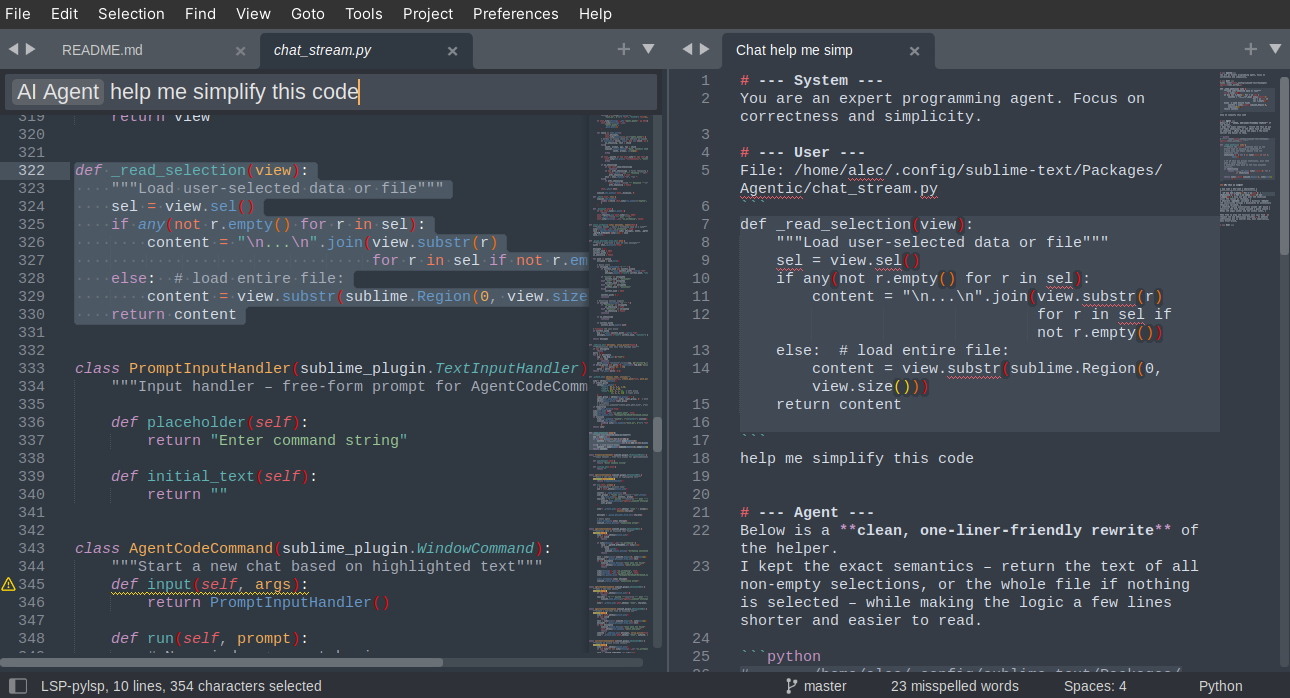
I just made my own OpenAI-style API LLM plugin for sublime, basically just focusing on the chat interface. I run multiple copies of gpt-oss-20b-F16 on various computers I have, so I made a nice system for distributing requests to a pool of agent configurations. I also added a feature to define custom prompts (“actions”) through the plugin settings. Overall, it is delightfully zippy compared to most web-ui’s. It is also nice that it is integrated with sublime, so you can highlight and chat, save routine prompts, etc.
I have only tested it on local LLMs so far, but if anyone wants to try it out on OpenAI or Groq, it should work, probably. The plugin is only like 450 lines of Python.
1 Like
alec
#37
I have now tested it with most of the the major API providers, and it works without issue so far.
I also implemented time-based cost estimation, so you can see the estimated cost of each query (if you fill out model information properly).
It is a very minimal and fast plugin, only a single python file, and it should be pretty easy to hack if you have any ideas. I also implemented sanitizing unicode characters, so your models will not add a bunch of unicode garbage into your codebase 
1 Like
charlie_b
#38
It is great that you are being transparent that there are no plans to support a way to integrate AI coding assitants.
I’ve rarely used sublime text so I dont have a horse in this race.
I do use Cursor which is a VS code fork and can say that the coding assitants are now incredibly powerful and professional devs who are not using them are costing there employers money because they could be 3x more productive at writing code.
IMO Sublime text will become less relavant to developers unless it offers a way to integrate coding assitants.
0 Likes
MrGrymReaper
#39
If people absolutely need or are required to use AI there’s Claudette (https://packagecontrol.io/packages/Claudette). Which is very well integrated into Sublime Text, with chat and code suggesting functions. If a particular function isn’t implemented it can be with a merge request to the appropriate GitHub repository.
0 Likes
Gotlib
#40
Sublime Text “power user” for years and created a forum account just for this!
I strongly disagree with these statements.
Cursor is terrible, only for low-quality codebases. The initial output is impressive, and then it clutters everything till your repo is a mess.
Not even speaking about vscode being an Electron app, frustratingly slow to use.
We use Sublime for a reason and AI is not one of them.
If you want to use AI anyway, the best is to use code agents from the CLI, in addition to ST or SM. My guess is that SM is probably even more useful in that case.
Thanks for keeping ST lean and AI-free.
4 Likes