
Since this is an “outlier” post (for a minority) and there seems to be no interest in the topic of Subl pairing with (initially) Ubuntu apps I am removing the post and placing it in my own datavault. I wlll get on with research.
Buddy Apps
I have had to create a fresh forum profile (so I am a twin of my first ID … innovator). At least this clears my Subl driving licence. Now pursuing my theme “paired apps” (dropping the original idea of “buddy app”). On the right of Subl Text tabs there is “All Files” with a long scrolling list. How can a paired (external) app access this raw list?
0 Likes
I’ve solved my navigation through chaos problems. Tried the GoTo Anything but did not meet my needs. Now using two “Paired Apps” (dropping nickname “Buddy Apps”) Krusader and Recoll (Ubuntu) most of my foreseeable needs are met. I can search by various types … including phrases inside files. So I can search thus [ext:sublime.build] to show all Build files in a list, or [ext:sublime.snippet] and so on … mixing mime.type, name, content, date in search profiles. Other paired apps lined up to experiment. Custom sublime mime types must be defined in ~/.recoll … redad
Later addition. I picked up my thread again and expand below after @gbird questions.
0 Likes
gbird
#5
Hi Innovator x 2. Are chatting with your own doppleganger here?
For myself, I guess I need to understand the question, problem and potential solution better, in order to engage. I am a pragmatist and so need to have a more concrete sense of what you are trying to do, to see if there are any overlaps.
Perhaps if you describe what specific issue you are trying to solve or what creative solution you are providing. Screen captures would help. A screen video would be even better. Keep it simple so others can follow along.
Without this concrete framing, I am not quite sure what you are either asking or telling.
0 Likes
@gbird, Thanks for your interest.
doppelgänger ? No, simply that I lost password and decided to just launch … a new profile. Nothing supernatural.
A doppelgänger (meaning “double walker” in German) is a non-related living person who looks exactly like another, or a supernatural ghostly double of a living person. Historically rooted in mythology and literature, these doubles were often seen as omens of bad luck or impending doom.
Hmm.
Now to the point of my odd writings.
I guess I can summarise by replying “order out of chaos”.
[Question, problem and potential solution?]
Question: Can Sublime Text act as a host for paired apps collaborating peer-to-peer?
Problem: Multiple editing profiles in use across multiple apps. Can a central editor be used to insert text into pairs apps?
Potential Solution: Think of a Venn diagram with several apps. Overlapping paired apps editing internal XML structure (only works with XML framework). The core of the Venn diagram is the common Subl editing zone. No need to adjust vision for each App.
I am just an engineer of some 70 years standing and my eyes glaze over when I see the complexity of some tools. Just look at Blender. Even Subl.
So I decided to take the easy route and rather than come to grips with the mysteries of Sublime Text to invite other collaborating (“paired”) tools into the party. Join the Venn diagram.
I run on Ubuntu. I can use Windows in dual boot … when forced to.
There are superb opensource tools on Ubuntu but Sublime Text offers a one stop for these elderly (86) eyes. So rather than adjusting to different UI editors, themes, settings I hit on the idea of usinng Sublime Text as my core scribing tool. One setting in Subl. Some companion tools I use I can barely read. In other words writing the elements within the host Sublime Text. The centre of Venn Diagram.
It is all text at the end of the day.
And so I progressed to inviting other tools into the party. If they are XML based.
Search thus: “Which Ubuntu desktop tools such as for example Adobe adopt XML syntax?”
Starting with CherryTree which is a hierarchical notes editor I mused that I could edit the interior elements of CherryTree - within Sublime Text - provided that I use *.ctd extension (which is XML). And so I installed Exalt for XML syntax.
Sure enough I can edit *.ctd files within Subl Text, subject to learning to avoid the syntax coloured tags. But one soon learns.
Moreover I can sync Subl Text with CherryTree by going to CherryTree Preference > Miscellaneous > Reload after external update.
So we now have CherryTree as an appendage to Sublime Text. An interesting feature of CherryTree is that there can be rich text and codeboxes … and links to external resources … so code snippets with a CherryTree container can be extracted by Subl editor.
I have extended this thinking to invent the “AI Shuttle Protocol ®” where CherryTree is shuttled to an fro.
Human <-> AI <-> Subl Text.
But I digress.
The next “Paired App” problem is that I am in browser sessions, or Email, or some other planet removed from Subl Text. I want to stay in focus and copy or jot down notes directly into Subl Text without jumping out of my primary session.
And so step forward Albert. Now I have a very visual mind and I remember writing somewhere here that it reminds me of the old sci-fi film (1951) where Robot Gort has a visor. Sure enough I am in my other session and I simply type [Ctrl+Shift+Space] and I can type command … snip … to create a snippet to fire into Subl. Parallel worlds. I received several forum flag because I likened this to “klattu barada nikto” - but no sense of humour in some unknown flaggers. I was “OT”. No sking off piste allowed here. Unless it is your topic.
I trust that you get the drift. The old Atom “hackable” editor (sunset by GitHub in favour of VS Code) showed a proton with electrons orbitting. I view Subl Text as the proton and the electrons orbiting include CherryTree, Albert, Actiona, any XML compatible “Buddy App”. And custom apps. A one stop editor for my old eyes.
Leverage the galaxy of Ubuntu Apps.
Finally I have conceived another “black adder” plan.
I can launch “AI drones” from within Sublime Text. Is this guy mad? What does that mean?
I mean (provided Ubuntu is in Xorg mode not Wayland) launching (using various devices in Subl and Paired Apps) AI drones which drive Subl Text UI. Or other UI’s such as filling in your tax returns.
That is using the AI drone to hit various keys and other vectors to automate the auto driving of Subl Text (and others). This rather puts YouTube teachings with screenshots out of business. I can never read the screenshots anyway and the videos are taken up by the tutor.
And so progressing forward instead of posting scripts in here we can just post a link to launch an AI drone from an approved repo.
When I have time I will create a few demos. The days of copying and pasting code are numbered. I have this model working in AI discourses. Switching to visual mode the chats we see I liken to the - Turner Prize “a pile of old ropes”. Search that theme, I don’t have the link since it would require me to come out of this editing.
I remember visiting a NATO futures workshop way, way back (1960’s) and I was asked: “What do you foresee” and I replied to my colleagues “I foresee a chip planted in the human brain”. They chortled. 60 years later Musk steps forward with same.
I see that all the need for memorising key sequences will go. AI drones will take over driving desktop tools. And I am already experimenting with my basic tools. Paired Apps.
I do not offer screen videos at this stage as requested but when I have time I will write in quarto and use Subl text to build a Jupyter Notebook or slides deck. But not today. Or if CherryTree is installed a CherryTree “shuttle”.
Regarding my side question about grabbing the dropdown list of files. A better way is to leveragePaired Apps Recoll and RipGrepAll. I can in Recoll see every file and search for internal content to narrow the research. Recoll I regard as an essential Paired App with Sublime Text. But the mime types (extensions such as sublime-snippet) must be added to /.recoll.mimeconf. Now I can sort by extension such as show all sublime-snippet extensions … including internal context.
I could write this in Sublime Text and paste here. Might try that next. Or a AI drone to grab text from these forums and use Recoll. Are you aware that these forum browser sessions can be indexed in Firefox if the Recoll-we extension is installed? Create a Firefox Profile Sublime and install Recoll-we. Play.
Coffee time.
Returning to add this example of why I need a consistent editor view.

0 Likes
For those interested enough to install CherryTree (just one Paired App) here is an example. Except I find that I cannot upload *.ctd so I will try a datavault later. Busy right now.
0 Likes
Next “Paired App” to follow in concert is Actiona. https://github.com/Jmgr/actiona
For this we need to install Actionscript3 as Subl package.
We can write variables in Subl Text with extension *.as. Nice clean viewing.
Some detective work is needed with this “museum piece” as referred to by Gemini. But it works dang it. Again XML code. Interior elements composed inside Subl Text. Use Build Actionscript (for example) to launch an AI drone. Later trials with later generation TagUI.
This is the foundation for the “AI drone” thinking. Launching desktop drivers from Subl Text. Contemplating navel of Subl Text. That is, “driving” Subl Text UI. Prototypes when I find time.
These *.as scripts, incidentally. I have taught AI Agents to produce. So AI drones can be AI created. Or human created. Or moderated. AI Agents just have to be taught the rules.
==============================================================
Later input.
I am experimenting now with different “classes” of AI drones built in Sublime Text using “paired apps”.
I also align with an earlier thread created by my doppelgänger
Vision. A “special operations” team of AI drones (“paired apps”), with Subl as edit, build and launch deck.
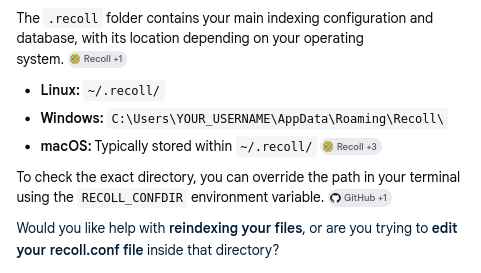
Tip: Given that Recoll is first installed this explains how Subl proprietary mime types such as “sublime-snippet” and “sublime-build” can be indexed and indeed previewed and edited by … a “paired app” … Recoll. All the internal Subl text file ecosystem is exposed to the power of Recoll. It cuts out all the hunting in Sublime Text UI for files. You can used very advanced search criteria. Study Recoll manual or hover cursor over Recoll GUI query bar. You can also address Recoll through command line … recollq … within Subl Run Apps package. Some recursive thinking required. Think outside the Subl box.
https://www.recoll.org/usermanual/webhelp/docs/RCL.CONFIG.EXAMPLES.ADDINDEX.html
For example I can see a complete list of keymaps … by running [ext:sublime-keymap] … I am trying Mediawiker package … and since I have another “paired app” in play … Krusader … clicking on Recoll takes me straight to the Mediawiker package. QED.
0 Likes
gbird
#9
Wow, there is a lot going on there. I don’t even have the frame of reference to parse a lot of what you are saying, let alone understand what it does.
I will leave it to smarter minds than I - this bear of little brains needs something more tangible and concrete to sink my teeth into, and it is clear that our Venn diagrams don’t overlap in the slightest.
The only cultural touchpoint I share with you is Blackadder. It seems to summarise my understanding of this conversation:
Nursie:
That was another good idea! You are so clever today, you better be careful your foot doesn’t fall off.Queen Elizabeth:
Does that happen, when you have lots of brilliant ideas? Your foot falls off?Nursie:
Certainly does! My brother, he had this brilliant idea of cutting his toenails with a scythe, and his foot fell off.
That does not take away from your solution (whatever it is) - it seems that you have it dialled in for your own needs. Keep shooting for the moon. I’ll stay grounded so my foot doesn’t fall off.
0 Likes
@gbird, grasshopper, I do appreciate your puzzlement, like reading a paper on extropy as I recently had to do. Let me show you one practical working example since key bindings seems topical. Nearby post.
I open one of my multiple paired apps. Recoll. I search Subl via Recoll and up pops this . a recent installation of latest package …
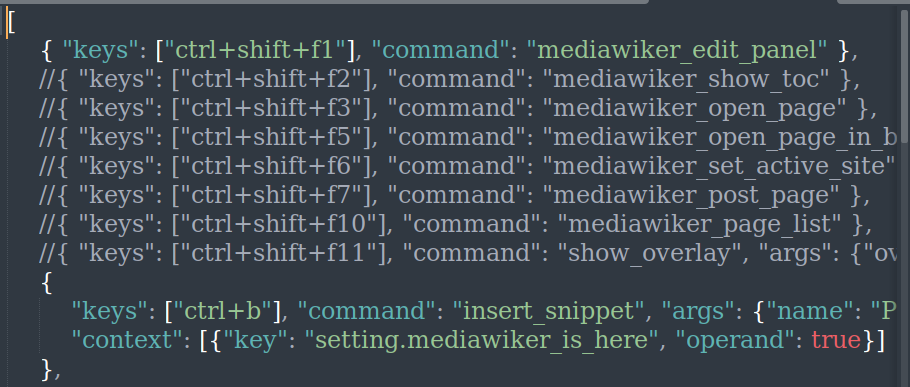
And there is the old saying … of many I use … “for want of a horseshoe nail the Kingdom was lost”
Benjamin Franklin
I still have head and feet screwed on.
Postscript. Going with the flow. I want to search for historical snippets.
I use in Recoll (which can be by command line) … [ext:sublime-snippet] and I have a WayBack Machine of snippets … I use my logi keyboard to capture part image … from Recoll UI.


I can open that with any tool I choose. I can extend that simple command to look for sublime-snippet … containing regex terms … more blackadder ideas to follow. Including launching a swarm of AI drones. Or dynamic management of SVG objects.
Here is another Recoll search:

One example, again using MX screenshot (desktop app flameshot is not needed with my keyboard, but it can be used to overlay comments).
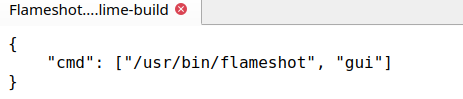
QED
O.K. we keep rolling. Feet screwed on. Find all my plugins.
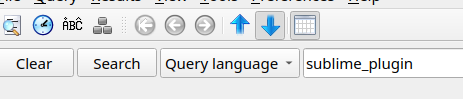
Actually I have noticed an error. I am using underscore instead of dot in syntax in my tests.
__________________________
Much later addition to this post for clarification … the conf files for Recoll. Just to add the point that RecollGUI is great for listing files matching complex queries whereas the command line option recollq allows precision find. Depends on your workflow. I use both.
0 Likes
Next tip from experiments … Albert as paired app … save your AI discourse dumps in Subl Text (such as Gemini, Claude) then use Albert > File to search the Subl txt dump. Or to search your Subl galaxy. Ubuntu only. Other solutions for Windows, Mac. This is a Ubuntu ship.
Extending this “paired apps” research. I have evolved thinking to today (24 June) using Sublime Text engine to master long discourses (chats) with AI beasts. Tasks are pre composed in Subl snippets with XML tags (including metaphors) and using Build are sent to AI browser or app thus retaining sovereignty of knowledge. The old “Robot Gort” model which earned my twin (doppelgänger) some OT flags works admirably. Full marks for the underlying Subl engine. I wonder if I might ask my twin to ping this thread to keep the discourse going.
Squeezing another tested idea into this box as archive since I cannot reply to myself. If the CherryTree tip is pursued, simply … add a CherryTree build script which just launches the Subl Text within CherryTree whereit can be refined and printed as PDF or other choice. In fact many of the Subl Build options can be embedded in codeboxes and executed in CherryTree. A great pairing. example dispensing with multiple scripts in Subl
0 Likes
Have to report here than “moon shot” works nicely.
Using CherryTree (shuttle) _ Subl Text … removes the need
for scurrying around in AI browser session.
Scrolling up and down, copying, pasting
Slashing subscription costs for big token models.
Slashing use of energy and water.
The context memory sits in desktop. Secured.
No more dementia of AI Agents.
And Subl is at the core with paired apps in concert.
Including my old friend Albert which has earned some flags here. OT. Like football.
0 Likes
gbird
#13
Try as I might (and trust me, I have tried really hard), I can never find true meaning in your posts. I read them several times, scratch my head and wonder:’
Is it me? What am I missing?’
At the risk of being repetitive, you will get better engagement if you can neatly and succinctly describe the problem and solution, using the fewest words possible. Keep things grounded and factual - avoid oblique references or esoteric flights of fancy. As colourful as they might be, they just serve to confuse and obfuscate. Not everyone lives in your headspace or has the same cultural touch-points, so it just serves as white noise.
The very best thing would be a short screen video of your problem and solution in action. 60 seconds tops. Then we will have something to anchor ourselves in.
You might - and likely do - have something of great value to share … I just can’t ‘see’ it. Others might have greater success, but the fact that I am a silent voice in this thread might suggest otherwise.
0 Likes
Good feedback. You are saying that there is too much entropy (noise) in my writings.
Like reading the Rosetta Stone.
Problem: Too much entropy in use of apps such as Sublime Text and AI Agents.
Knowledge scraped by AI with poor memory retention (silos), leading to higher subscription costs
to run their Ferrari engines.
Solution: Take back control and sovereignty of knowledge at Edge. With Subl paired apps.
But a basic working demo I will create. I shall return. When I find time.
0 Likes